> ## Documentation Index
> Fetch the complete documentation index at: https://support.telivy.com/llms.txt
> Use this file to discover all available pages before exploring further.
# Identity and Access Management
> Use Telivy to Create and Manage Passwords
## Password Management
Weak, reused, and leaked passwords are a common entry point for attackers. Telivy analyzes the passwords in use across an organization to surface these weaknesses.
## Password Capture
The Telivy platform captures passwords from users to analyze them for weaknesses (next section). When deploying the Telivy executable, a password analysis capture tool is deployed to securely analyze the passwords stored in the user's Chromium-based browsers. Because of how Chromium encrypts passwords, a user has to be logged in to capture the passwords or the capture will be triggered once the user(s) log in.
To reduce any liability for you, we perform password analysis on the device and the clear text passwords are never stored in our servers. Telivy however stores the hash of the password. Hashes cannot be reverse-engineered to generate the password.
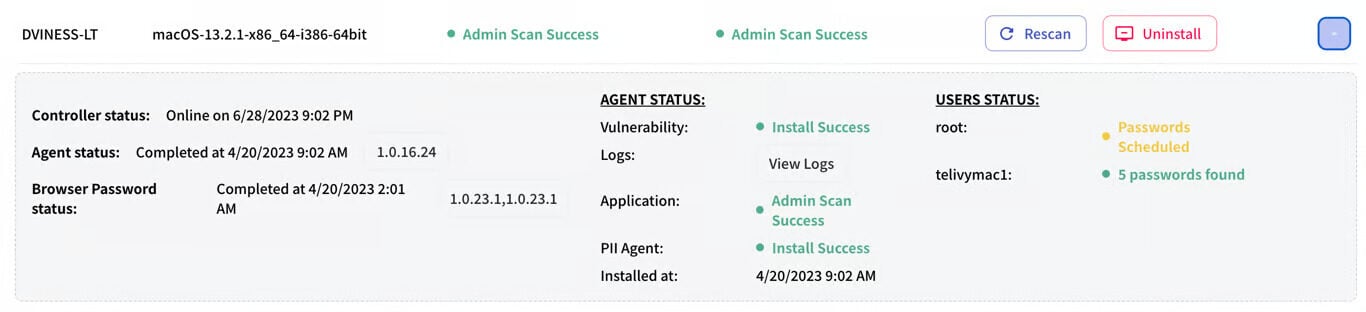
If the executable is deployed as an admin, the executable will schedule password capture for most of the users that are present on the asset. The list of users is determined by the folder structure, Microsoft Azure AD user setup, local and global users configured on the system and a few different heuristics. In some cases, not all users are covered for password analysis. The assets table should show you the list of users the password analysis is scheduled for.
 ## Why Analyze Passwords? It's More Than Just "123456"
Password analysis examines each password for weaknesses. Here's why it matters:
Hackers often sell stolen usernames and passwords on the dark web. Telivy's password analysis tool scans your passwords against these databases, alerting you to potentially compromised credentials before attackers can exploit them. The password analysis table shows you the number of hits a password or username has been found on the dark web. Hackers generally start brute forcing by using leaked credentials. It is advised to not use any password that has been found on the dark web.
For example, the first entry has been leaked 9.65 million times on the dark web. This includes the password "p\*\*\*\*\*\*d", and the username cool\_dude.
## Why Analyze Passwords? It's More Than Just "123456"
Password analysis examines each password for weaknesses. Here's why it matters:
Hackers often sell stolen usernames and passwords on the dark web. Telivy's password analysis tool scans your passwords against these databases, alerting you to potentially compromised credentials before attackers can exploit them. The password analysis table shows you the number of hits a password or username has been found on the dark web. Hackers generally start brute forcing by using leaked credentials. It is advised to not use any password that has been found on the dark web.
For example, the first entry has been leaked 9.65 million times on the dark web. This includes the password "p\*\*\*\*\*\*d", and the username cool\_dude.
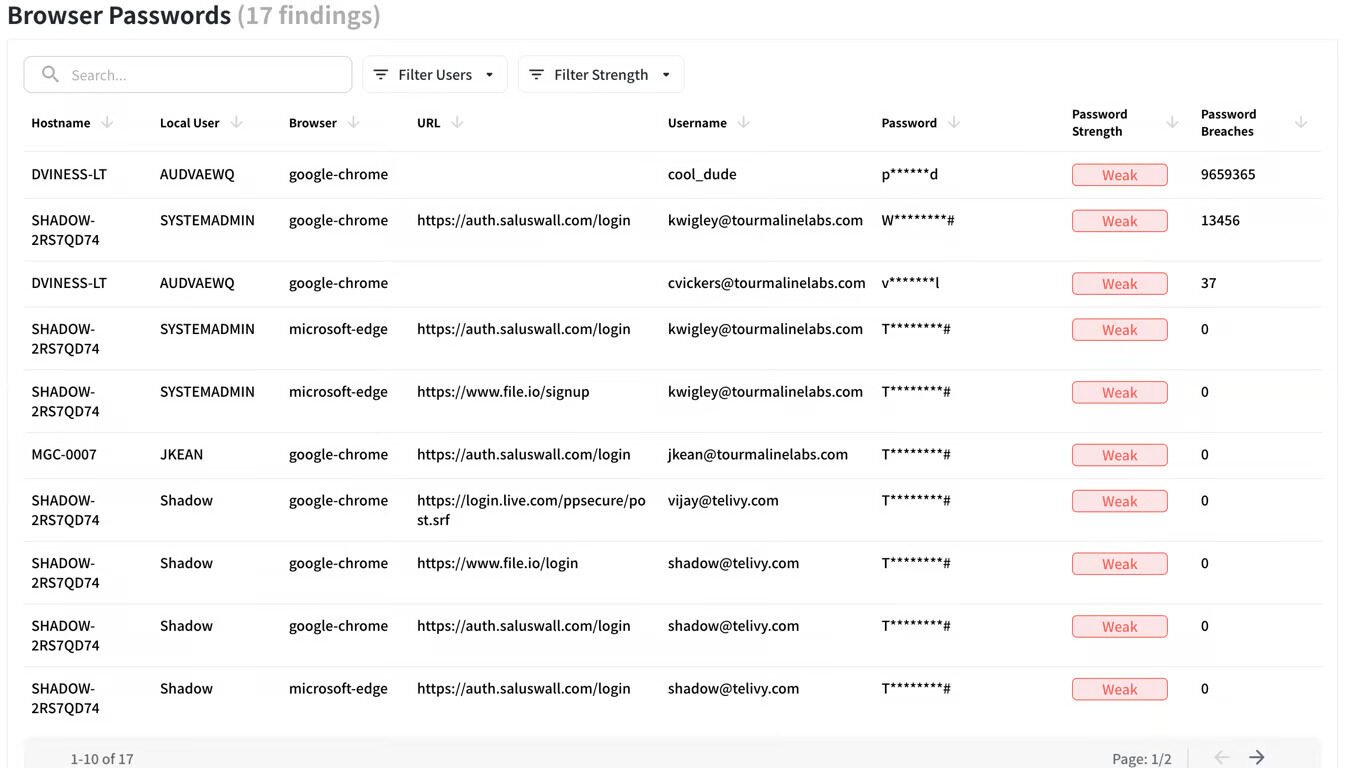 Not all passwords are created equal. Some, like dictionary words or simple numerical sequences, are easily cracked. Telivy's password analysis tool assesses password complexity, length, and character diversity, highlighting passwords that need urgent replacement.
For example, **qwerty** is a Weak password. **G00dPassw0rd?!** is a Moderate password and **V3ryG00dPassw0rd?!** is a Strong password. For more interested users, Telivy's analysis tool uses this library to determine the strength of a password.
We're creatures of habit, often recycling passwords across multiple accounts. This creates a domino effect: one compromised password could grant access to a multitude of accounts. Telivy's password analysis tool detects reused passwords so you can replace them with unique ones.
Not all passwords are created equal. Some, like dictionary words or simple numerical sequences, are easily cracked. Telivy's password analysis tool assesses password complexity, length, and character diversity, highlighting passwords that need urgent replacement.
For example, **qwerty** is a Weak password. **G00dPassw0rd?!** is a Moderate password and **V3ryG00dPassw0rd?!** is a Strong password. For more interested users, Telivy's analysis tool uses this library to determine the strength of a password.
We're creatures of habit, often recycling passwords across multiple accounts. This creates a domino effect: one compromised password could grant access to a multitude of accounts. Telivy's password analysis tool detects reused passwords so you can replace them with unique ones.
 In the above table, click on the Show All and the previous table will filter to show the instances where the password has been used.
## Acting on password findings
Identifying and fixing weak or reused passwords reduces the risk of account compromise.
In the above table, click on the Show All and the previous table will filter to show the instances where the password has been used.
## Acting on password findings
Identifying and fixing weak or reused passwords reduces the risk of account compromise.