

How open ports get exploited
Attackers scan the internet all the time with tools like Nmap to find open ports and identify the service behind each one. When they find a service with a known vulnerability or weak authentication, such as Remote Desktop with a guessable password or a database open to anyone, they use it to get in. From there they can steal data, install ransomware, or move to other machines on the network.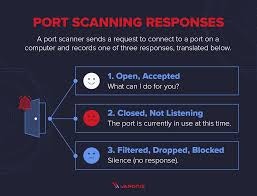
Example output from a port scan
How Telivy rates open ports
Every External Assessment and Risk Assessment scans the client’s internet-facing addresses for open ports. Telivy puts the ports it finds into three risk tiers. High risk. Close these unless they are absolutely necessary:- RPC Endpoint Mapper / NetBIOS (135)
- Remote Desktop (3389)
- Databases (MySQL 3306, PostgreSQL 5432)
- NetBIOS / SMB (137, 139)
- FTP (21)
- Telnet (23)
Remediation
- Find the open ports. Run an External Assessment or Risk Assessment to list the ports visible from the internet.
- Work out what each one is for. Identify the service behind every port and whether anyone still needs it. Start with high-risk ports.
- Close, restrict, or patch. Close ports nobody needs. For the ones that must stay open, limit access to known IP addresses or put them behind a VPN, and keep the service patched. Close open ports has step-by-step instructions.
- Rescan and record. Rescan to confirm the ports are closed, and note what you changed and why for future audits.
- Keep watching. New services get exposed by accident. Risk Monitoring rescans on a schedule and can alert you on new exposures through the Network / External Surface alert category.