

Billing
Account > Billing opens the Stripe billing portal, where you manage the subscription, update payment methods, and download invoices. Telivy doesn’t keep its own copy of any of that. Agencies billed through Unity don’t see Billing, because their invoices come from Unity. They still see Usage.Usage
Account > Usage opens Monitored Usage: the active monitored endpoints and SaaS user accounts behind your bill, one row per assessment. Hover over a column header to see what it counts.
Check this page before you query an invoice. If your invoice comes from Unity, Unity counts
each user once per customer. A customer with more than one assessment, or with both
Microsoft 365 and Google Workspace connected, can therefore show a higher total here than
on the bill.
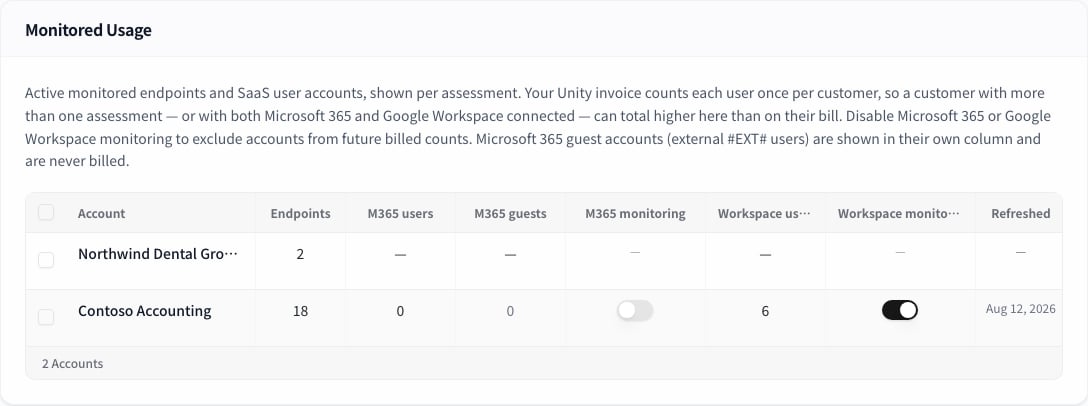
Turning monitoring off for several clients
Select rows with the checkboxes and use Disable M365 or Disable Workspace. After you confirm, those accounts drop out of future billed counts, and new monitoring alerts and findings for that source stop. Historical records stay as they are. If some rows fail to update, the dialog stays open and lists them.Early Access
Account > Early Access lists features you can turn on before general release, grouped by how finished they are: beta first, then alpha, then concept. A toggle applies to the whole agency. Only account admins can change a toggle, so other users see the list read-only. Some features are marked sensitive, and you have to acknowledge what enabling them does before the toggle takes effect. Concept-stage features change often, and some are removed.Unity
Agencies linked to Unity get a Unity page, listed under Integrations. It shows each client company with its Unity link, subscriptions, device count, and user count. Microsoft 365 guest accounts appear as a “+N guests” line under the user count, for the same reason as on the Usage page: they are visible but not billed. The Action column opens the client’s Risk Assessment, or creates one if the client doesn’t have one yet. If every assessment for a client is archived, the row is marked as archived and offers View to open the archived assessment and New assessment to start a fresh one. The archived assessment stays available. Creating an assessment from this page needs either an agency-wide Assess subscription, a Monitor subscription on that client, or Foundations coverage for that client.Related guides
Account overview
Profile, users, and sharing or reassigning assessments
Risk Monitoring
What monitoring does, and what it counts